Total Pageviews

Sunday, March 30, 2014

Stock Book Pro v1.0


Every office maintains a stock book for keeping track of its incoming and outgoing commodities. The software stock book pro is developed keeping this in view. 
It offers flexibility with high security. Written below are few facilities provided by it:

1) It provides user authentication. User needs to login before using the software. Every successful and unsuccessful login information is saved for checking any unauthorized access.

2) It has different domains. There is an administrator domain with higher access privileges of the software like modification of login details, database backup, creating and deleting of user domains, etc.

3) All modification user details are saved. If any user creates a new stock record, modifies a record or deletes a record then his user details and operation time will be saved so as to track any unauthorized access.

4) Backup Database: The database can be backup up by a member of the administrator domain. The user information and the path where it is saved is also saved.

5) Restore Database: The previously backed up database can be restored by a member of the administrator domain, user info and restore database info is also saved.

6) Scheduled backup of database. A backup of the software is automatically saved after every seven days of software usage. In order to avoid accidental loss of information due to windows crash the backups are not placed on windows drive.

7) Logout option. In case of leaving unsaved information open, the user can just logout of the software and keep the software status unchanged until next login.

8) User account creation: Only the member of the administrator domain can create a new user id, a new domain, delete a domain, create a new critical input and delete a critical input.

9) Few Restrictions: Once a stock book entry is made there cannot be any other entry made before that entry. If an earlier entry needs to be modified then the latest entries before the faulty entry is to be deleted or else editing is not possible. But all this information will be saved so there is no provision for unauthorized modification. Moreover the stock record is created by any other domain member but it can be deleted only by the member of the Administrator domain.

10) Stock book statement: Periodic statements of the all critical inputs or selective critical inputs can be generated and printed for use.

Given below are the screenshots of the software and the report generated by it.


Wednesday, February 12, 2014

Cash Book Pro v1.0

The cash book of any office is very important to maintain. This are checked from time to time by the audit authorities so it has to maintained with very much importance. The environmental considerations suggests minimizing the use of paper. This cash books can be maintained on computer software and can be saved for later use even. The software minimizes the time required to view a old record and the cashbook statement of any time period can be taken as and when required.
  1. It is highly secure, it keeps track of all the operations like cash book entry, old entry modify and old entry delete.
  2. The software keeps track of all the successful and unsuccessful login attempts.
  3. There is a provision of database restore and backup both of which saves their respective user information's.
  4. There is always a chance of sudden computer crash which leads to loss of data. In order to avoid such a scenario the software keeps a copy of the current database in a separate folder on a different drive.
  5. After every seven days automatic backup folders are created with name of folder as dates and database in it.

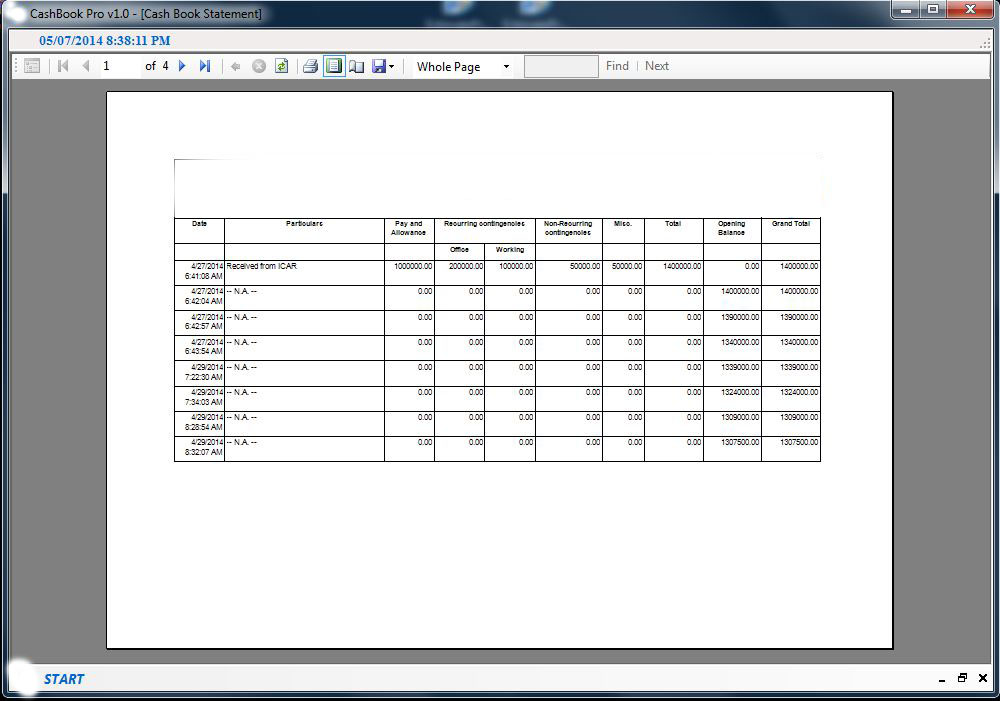
Given below are the screen shots of the softwares working:


Sunday, June 30, 2013

Accounting and Account Management


Earlier the office authorities were using log books as well as registers to maintain cash records. To get rid of this the TS v1 software was designed.

The main interface consisted of options like account creation, submission, loan sanction, loan installment payment, searching all types of information, viewing the transactions carried out in the software, viewing the statement of an account or loan and an option to back up the database.

The PR Account section consists of new account creation, account info modification and account deletion. At the time of creating the new PR account, details such as the name of the area, district, place, post office, police station and division are also to be entered. Modification of the PR account details are possible by entering the PR account number. But the PR account number cannot be modified so in case of some error in the PR account number the PR account is to be deleted first and then a new PR account has to be created.

The Submission section consists of new submission, modifying submission and deletion of submission. The submission is made against the existing PR accounts in the database. Each submission is made unique by entering a specific voucher number. Then this submission information is saved in the database as a unique record of the PR account. Modification of the submission is possible by entering the unique voucher number. Similarly the submission delete option also works by entering the unique voucher number.

The Loan section consists of new loan account creation, loan account info modification and loan account deletion. At the time of creating the new loan account, details such as the name of the person, loan amount, and interest rate, loan period in months or year, number of payments per year, starting date of loan, scheduled payment and scheduled number of payments are also to be entered. Modification of the loan account details are possible by entering the loan account number. Similar to the PR account the loan account number cannot be modified so in case of some error in the loan account number the loan account is to be deleted first and then a new loan account has to be created.

The Installment section consists of new installment, modifying installment and deletion of installment. The installment is made against the existing loan accounts in the database. Each installment is made unique by entering a specific payment number. Then this installment information is saved in the database as a unique record of the loan account number. Modification of the installment is possible by entering the unique payment number. Similarly the installment delete option also works by entering the unique payment number.

The search section consists of search options based on account number, voucher number, and payment number. Account number of both PR Account as well as Loan Account are accepted. The payment number of loan installment and the voucher number of PR account submission.

The Transactions option provides viewing of all transactions based on PR account created, PR account modified, PR account deleted, PR account submission created, Pathian ram account submission modified, PR account submission deleted, Loan account created, Loan account modified, Loan account deleted, Loan account closed, Loan account installment created, Loan account installment modified, Loan account installment deleted, Loan account installment (s) cleared and Scheduled backup
In the Statement section we can view both PR Account statement as well as Loan Account statement of the given date range.
In the System section there are utilities like calculator and notepad. It provides an option for Logout and Exit. It also consists of the about section where software’s development details as well as developer details are available.


Add caption